grill-and-drill · codezoom 1.2.0 on npm

codezoom

A tool for walking an unfamiliar C# codebase, a Unity project or a .NET solution, one type at a time. You pick a type, and codezoom draws a UML diagram of everything connected to it. Click any neighbour and it becomes the centre. That is the whole loop, and it is how you learn the architecture. Since 1.2.0, a Unity project's scenes, prefabs and ScriptableObject assets are nodes too, and since 1.1.0, coding agents can ask the same questions through MCP.

Unity and .NET C#scenes and prefabs as nodesruns in the browserno Unity install needed to read codemoves draw in under 100 msMCP tools for agentsnpx codezoom

Demo · 55 seconds

Watch it on a sample project

Recorded from the real tool, driven by a script, on TinyTowers, a made-up tower-defense project built for this demo. It opens with the setup wizard on a first run, then shows Focus, Weight, Drill, Back, Jump and the source panel.

What the tool does

One type in the middle, its neighbours around it

The type in the middle is the Focus. Types that depend on it sit in a row above. Types it depends on sit in a row below, so every arrow points down toward what gets used. Four moves get you around:

Focus

codezoom Tower

The type the screen is centred on. You name it on the command line, or pick it later.

Drill

click a box

A neighbour becomes the new Focus. The view zooms into that box, so you never lose your place.

Back

⌫ / ↩ box

Return to the previous Focus. Each session keeps its Trail, so Back retraces your steps.

Jump

/ search

Go straight to any type by name. Word starts work: WSp finds WaveSpawner.

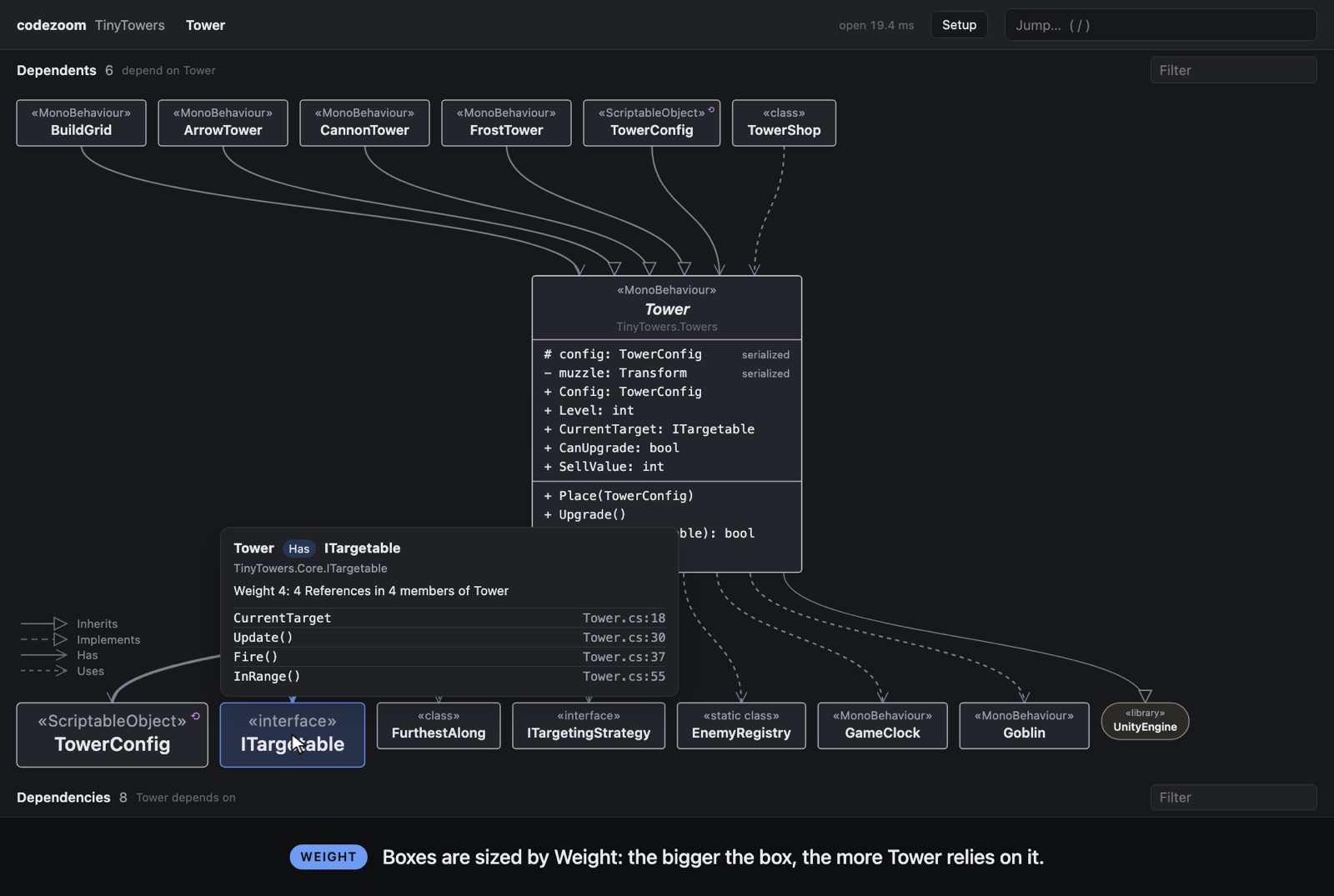
  • Boxes are sized by WeightWeight is how heavily the using type relies on the other: the References it makes, and how many of its members make them. The biggest boxes come first, so the main dependency stands out at a glance. Hover a box to see the count and the exact lines.
  • UML edges, simplified to four kindsAn edge stands for every Reference between two types and is drawn as the strongest kind among them.
  • Libraries are single nodesUnityEngine, a package or a vendor SDK each collapse into one rounded box, so your own types aren't buried under Transform and Vector3.
  • Source one click awayClick the Focus to read its code. Hovering a neighbour highlights its References, and "Open in Rider" jumps to the line.
codezoom showing Tower as the Focus, with TowerConfig and ITargetable drawn large in the Dependencies row and a hover card reading Weight 4: 4 References in 4 members of Tower
Tower as the Focus. TowerConfig and ITargetable are drawn large because Tower leans on them hardest. The hover card lists every Reference.
Inherits: a type and its base class Implements: a type and an interface it implements Has: the type of one of its fields or properties Uses: any other Reference

The demo project

TinyTowers, set up with the wizard

TinyTowers is a small, made-up tower-defense codebase in examples/TinyTowers: 43 C# files of towers, enemies, waves, an economy, saving, UI and editor tools. It has never been opened in Unity. It deliberately includes things a real project has and the wizard has to sort out: a test assembly, a vendor plugin under Assets/Plugins, and an editor-only assembly.

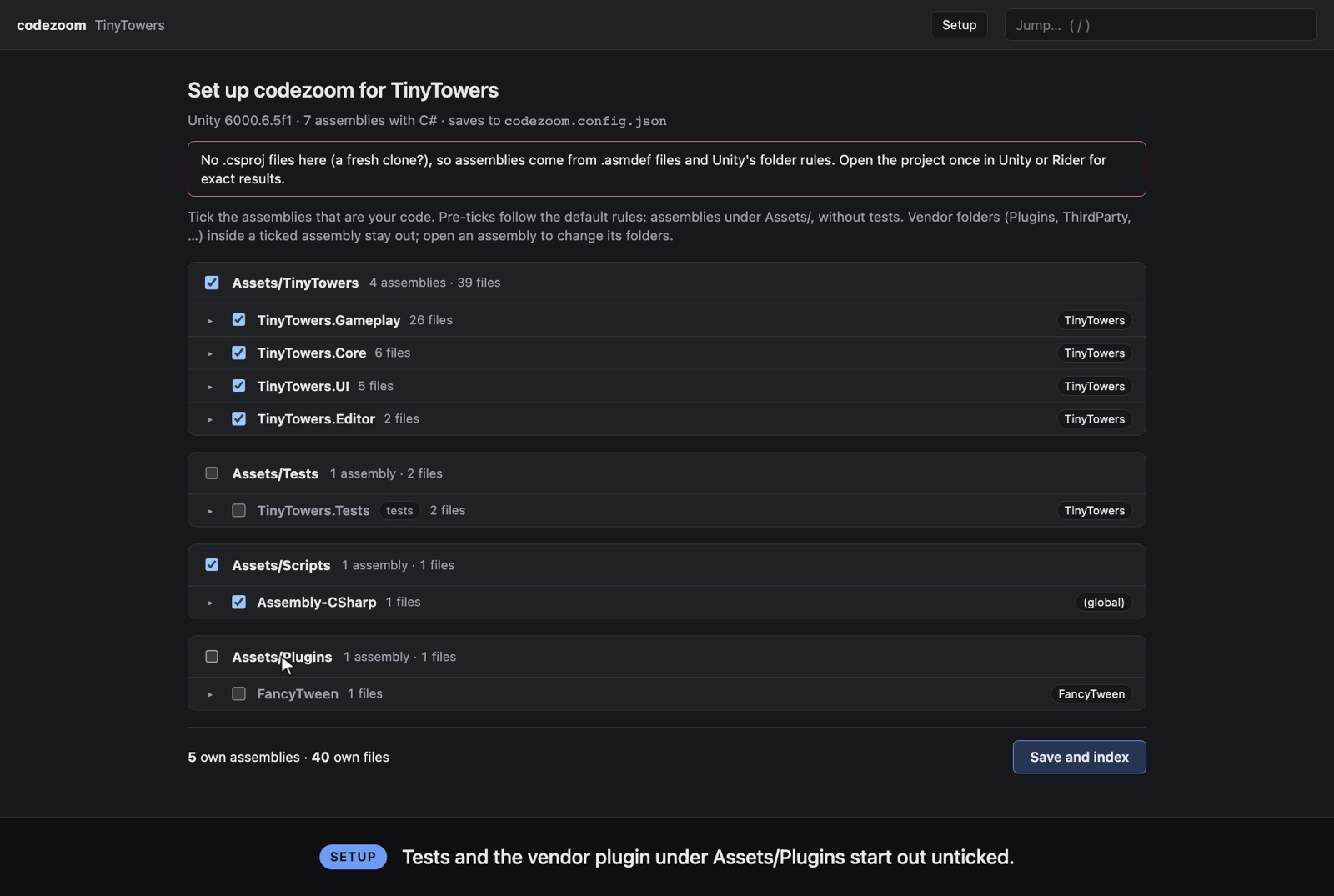
The codezoom setup page for TinyTowers, listing assemblies grouped by folder, with TinyTowers assemblies ticked and Tests and Plugins unticked
First run: the setup page lists every assembly, grouped by folder, with codezoom's guesses already ticked.

With no .csproj files, codezoom read the assemblies from .asmdef files and Unity's folder rules. It borrowed UnityEngine's type tables from the Unity 6000.6.5f1 editor installed on this machine. The default guesses were right, so the wizard needed no changes; one click on Save and index wrote:

{
  "assemblies": [
    "Assembly-CSharp", "TinyTowers.Core", "TinyTowers.Editor",
    "TinyTowers.Gameplay", "TinyTowers.UI"
  ],
  "excluded": ["FancyTween", "TinyTowers.Tests"]
}
AssemblyWhereFilesWizardWhy
TinyTowers.GameplayAssets/TinyTowers26own codetowers, enemies, waves, economy, save
TinyTowers.CoreAssets/TinyTowers6own codeevent bus, health, game clock, interfaces
TinyTowers.UIAssets/TinyTowers5own codeHUD and shop, built on UI Toolkit
TinyTowers.EditorAssets/TinyTowers2own codeeditor tools are your code too
Assembly-CSharpAssets/Scripts1own codethe scene bootstrap, via Unity's folder rules
TinyTowers.TestsAssets/Tests2left outtest assembly
FancyTweenAssets/Plugins1left outvendor folder; drawn as one library node
47types
136edges
272References
3foreign libraries
0names not resolved
46 msfirst index
2–3 msper Drill / Back / Jump
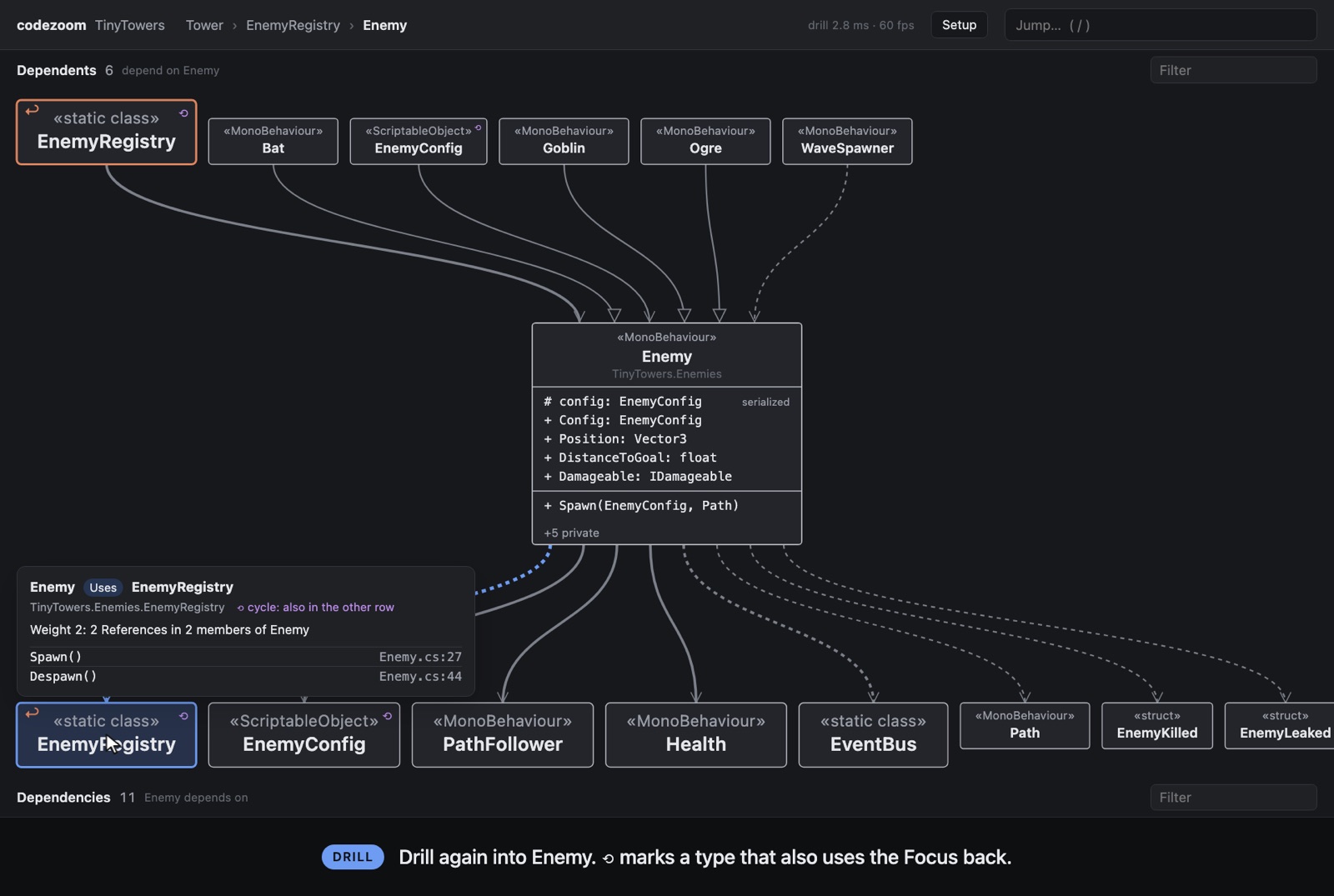
codezoom after drilling from Tower to EnemyRegistry to Enemy, with a breadcrumb trail at the top and EnemyRegistry marked as the previous Focus
Two Drills in: Tower › EnemyRegistry › Enemy. The ↩ box is the previous Focus. ⟲ marks a cycle: Enemy and EnemyRegistry use each other.
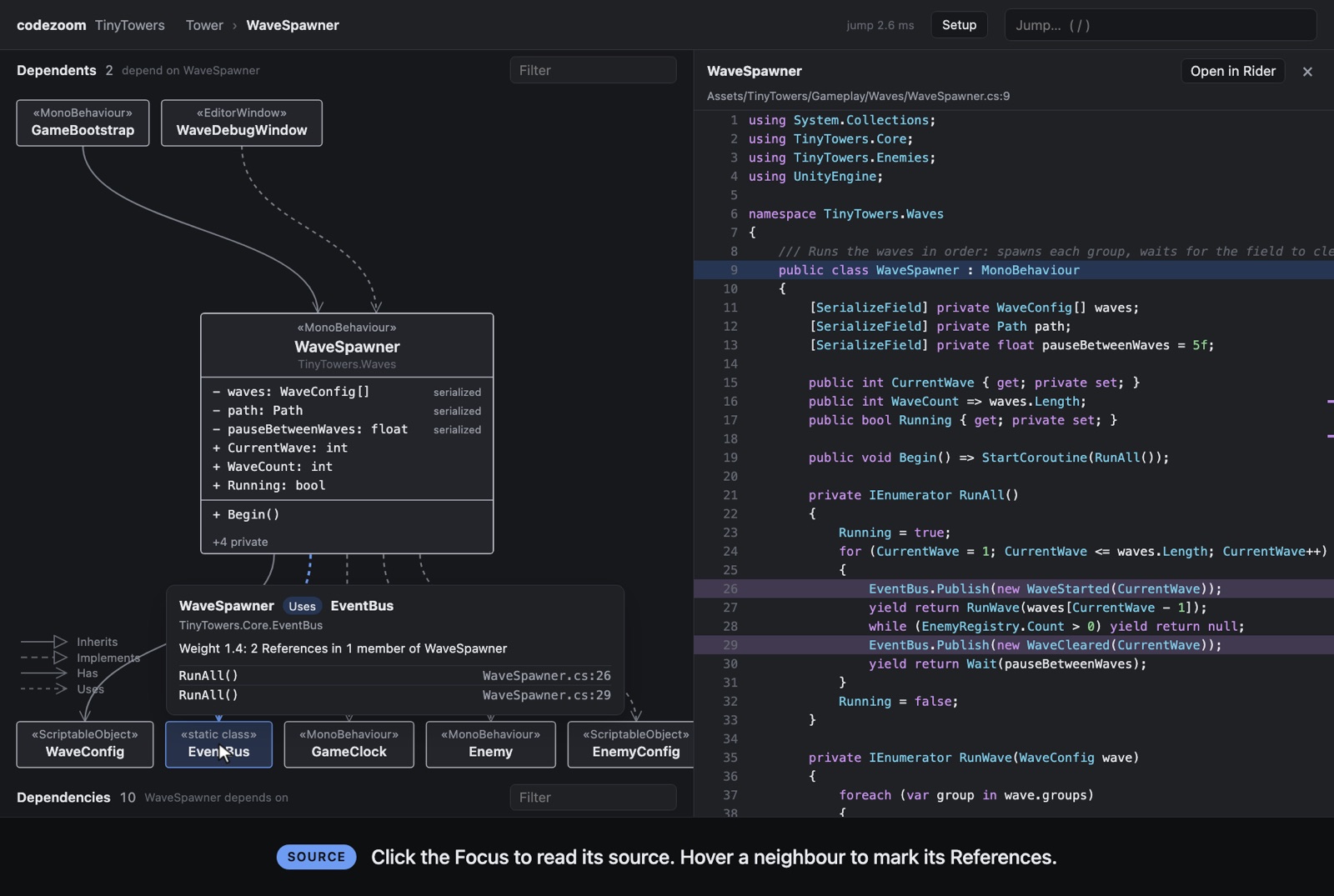
codezoom with the WaveSpawner source panel open, lines 26 and 29 highlighted because the EventBus neighbour is hovered
After a Jump to WaveSpawner, its source is open. Hovering EventBus highlights the two lines that use it.

Where it came from

How the four reference repos shaped codezoom

The idea came from a livestream with Uncle Bob on Matt Pocock's channel, and the research started from four of Uncle Bob's tools. codezoom shares no code and no file format with any of them, because none of them can read C#, and the user's projects are mostly Unity C#. What it took from them were ideas, conventions and a few deliberate disagreements.

uml-viewer

Clojure + Quil · live, clickable UML of a namespace tree

The direct ancestor, and the source of the most important disagreement. uml-viewer starts at the project root and drills down: double-click a package to see what's inside it. codezoom starts anywhere and moves across: the Focus is any type, and drilling re-centres on a neighbour. That one change is why the core terms are Focus, Drill, Back and Jump, and why "Back" means returning along your Trail, not climbing to a parent folder.

Carried over

  • The promise of a UML you click through, all the way down to the source line.
  • UML arrowheads for inheritance and interfaces, plain arrows for dependencies, cut down to four edge kinds.
  • Outside libraries drawn as one rounded node each, set apart from your own boxes.
  • Arrows pointing down toward what gets used, the same reading direction uml-viewer gives "good" dependencies.
  • A split between what a person decides (uml-viewer's policy file, codezoom's codezoom.config.json) and what the tool regenerates and nobody edits (its IR, codezoom's index).
  • Reading code into language-neutral facts first and building the graph from those, which leaves room for a second reader later.

Left behind, for now

  • The containment drill: zooming into nested namespaces.
  • Colouring boxes by test quality (CRAP and mutation scores). codezoom uses box size for something else: Weight.
  • Architecture "levels" with red arrows for dependency-rule violations, and what-if regroupings.
  • The companion agent that edits code from the diagram.
  • Forking it at all: it runs on the JVM and has no C# reader (ADR 0001).

crapper, dryer, mutator

Python + tree-sitter · CRAP scores, duplicate code, mutation testing

These three are built alike, and they shaped how codezoom reads code rather than how it looks. Between them they show that tree-sitter is enough to understand code structure in several languages without a compiler. Their shared habits about which files count, and about only redoing work that changed, show up in codezoom almost one for one.

Carried over

  • tree-sitter instead of a compiler. codezoom parses C# with tree-sitter and resolves names itself, so it works on a fresh clone with no Unity or Roslyn (ADR 0003).
  • Which files count. Like their discovery rules, codezoom always skips build output (Library, Temp, obj, .git), leaves tests out by default and treats Plugins, ThirdParty and vendor folders as someone else's code. The setup wizard is those defaults made visible and editable.
  • Only redo what changed. mutator keeps its results for any function whose text hasn't changed. codezoom caches what each file gave in .codezoom/ and re-reads only changed files: a large project relaunches in 0.8 s instead of 2.8 s.
  • One stable name per unit. They agree on a namespace-plus-name key for every function. codezoom keys every node by its full type name (TinyTowers.Towers.Tower), so layering metrics on later would be a lookup by name.

Done differently

  • None of them read C#. That gap, found in the first grill round, is why codezoom has its own reader and name resolver for namespaces, usings, aliases, nested and partial types.
  • Their unit is the function. codezoom's node is the type, because the goal is architecture, and a method-level call graph would multiply the boxes and need exact call resolution (ADR 0002).
  • Their results are committed snapshots in .metrics/. codezoom's cache is git-ignored, because it is a speed-up, not a result.

From research to v1

The research write-up named the overloaded words up front: "entry point", "drill" and "level" each meant something else already. The grill-with-docs interview turned them into the glossary's preferred terms. Focus replaced "entry point", and "level" is on Back's avoid list. Four ADRs record the decisions that would be hard to undo.

  1. 7c08086Research on the four repos, plus Matt Pocock's grill-with-docs skills
  2. f1443c9Glossary and four ADRs from the grill session
  3. d8a0719First slice on 2d-space-survival: Focus, Drill, Back, Jump
  4. 5781cf1Works on a large production project
  5. f0e563cZoom animation, source panel, cache and watching, Weight sizing
  6. 699dc54Setup wizard: the last v1 feature
  7. 2f114e5Golden walks and tests; published to npm as 1.0.0
  8. 1.1.0Agent access (MCP and --json) and plain .NET C# projects
  9. 1.2.0Unity assets as nodes: scenes, prefabs and ScriptableObject assets

Where it stands

Released as 1.2.0, with one sign-off to go

Done

  • Focus, Drill, Back and Jump, with the zoom animation
  • Weight-sized boxes and four edge kinds
  • Source panel with Open in Rider
  • Per-file cache and live re-indexing
  • Setup wizard for choosing own code
  • Golden walks: codezoom walk replays them, and 57 tests run before every publish
  • Agent access: codezoom mcp serves search, screen and references, and --json gives the same answers in a shell
  • Plain .NET C# solutions: projects from the .sln, one node per NuGet package
  • Unity assets as nodes: Contains, Assigns, Calls, Instance of and prefab variants, with an outline of each asset
  • Published to npm as codezoom 1.2.0

Still open

  • The "golden walks" sign-off: about five Trails through a large real project, checked by hand
  • Choosing what follows 1.2.0: TypeScript projects, quality colouring, or a precise mode with Roslyn

Known blind spots

  • The type of a var local and extension-method calls aren't seen (ADR 0003)
  • References made by string (Resources.Load, Addressables keys) are invisible, and materials, textures, audio and animations are not nodes (ADR 0007)

Credits

Who this builds on